AI Virtual Staging
Upload an empty or nearly empty room. Choose the room type and a furnishing style. Receive the same room, staged: walls, windows, floors and view held, furniture placed at realistic scale.

Complimentary for existing Nakada Design clients. A paid plan is available for ongoing volume.
The image on the right is an AI-staged version of the empty room on the left. Buyers must be told a listing photo is virtually staged.
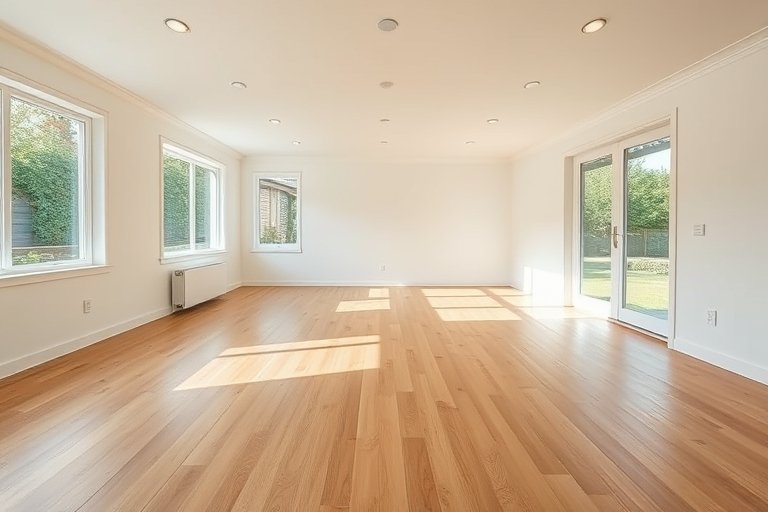
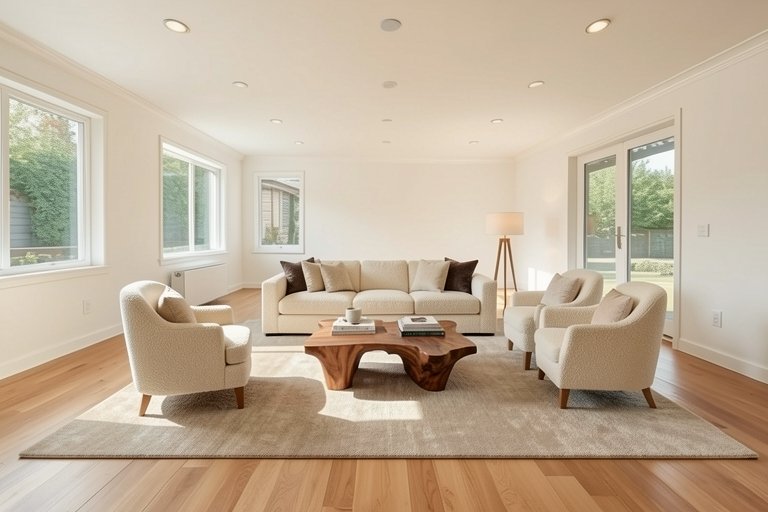
Static demonstration only. Your result will depend on the photograph you provide.
Results remain on screen. Download asks for an email once per browser. Complimentary for clients; volume use is available under a paid plan.

AI virtual staging furnishes an empty room photograph with generated furniture at realistic scale and in a chosen style. The walls, windows, floors, and view stay as shot, so buyers can read the true architecture while imagining how the room lives. It is faster and cheaper than renting physical staging for a shoot, and useful when a listing needs several furnished views on a short deadline.
The process is instructed to keep walls, windows, floors, views, and camera angle exactly as photographed, and to add furnishings only. Perspective and scale can still drift on difficult frames, so check chair heights against doorways, rug edges against baseboards, and window mullions before you publish.
Yes. MLS rules and advertising standards expect virtually staged photos to be labeled, and the unedited original should remain available on the listing. A clear "virtually staged" caption on the image or in the remarks is standard. Never present staged furniture as if it ships with the home.
A wide, level, well-lit frame of an empty or nearly empty room works best. Strong wide-angle distortion, leftover clutter, or heavy existing furniture in the source reduce quality. Shoot from a corner with the full floor plane visible when you can.
Complimentary for existing Nakada Design clients within daily limits. Studios that need steady volume can move to a paid plan. Every result is a draft: review lighting, edges, and material detail before you publish, send to a client, or upload to an MLS.